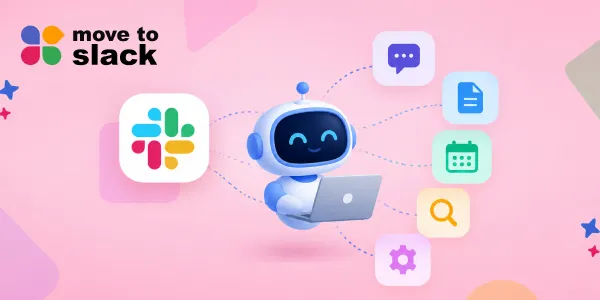
Slack is evolving beyond a messaging platform with the introduction of the Slack MCP Server and Real-Time Search API, enabling AI agents to interact with live workspace data. This integration allows AI to search conversations, understand context, retrieve information, send and schedule messages, create channels, and work with structured content. The MCP Server provides a unified communication layer, enhancing AI's ability to deliver context-aware responses based on actual discussions within teams. As businesses consider migrating to Slack, the MCP integration promises to improve workflows by facilitating collaboration between human users and AI agents, making Slack a more dynamic working environment.
Slack is becoming more than a place where teams send messages, share files, and discuss projects. With the latest updates around AI and MCP, conversations inside Slack can now become useful context for AI agents, while those agents can also take actions inside the workspace.
The biggest change is the availability of the Slack MCP Server and Real-Time Search API. Together, they give AI tools a more direct way to work with live Slack information, including conversations, files, channels, and other workspace data, while following the permissions already set by the organisation.
So, what can an AI agent actually do with all this? It can search conversations, understand the context behind a request, retrieve information, send messages, schedule messages, work with canvases, and perform several other Slack actions.
In this blog, we’ll look at what the Slack MCP Server does, how a MCP server for Slack works, what Slack MCP integration means for AI agents, and what businesses should know if they are planning to migrate to Slack.
What Is the Slack MCP Server?
The Slack MCP Server is a way for AI applications and agents to interact with Slack through the Model Context Protocol. Instead of building separate, complex integrations for every AI tool and every Slack action, MCP provides a common communication layer between the AI system and Slack.
The Slack MCP Server is designed specifically for AI-driven use. It allows compatible AI clients to discover available tools and use them to search Slack, retrieve information, send messages, manage conversations, work with canvases, and more.
This is different from simply giving an AI access to a database. Slack contains conversations where teams discuss decisions, projects, customer issues, ideas, and day-to-day work. That conversational context can help agents give answers that are connected to what is actually happening inside a company.
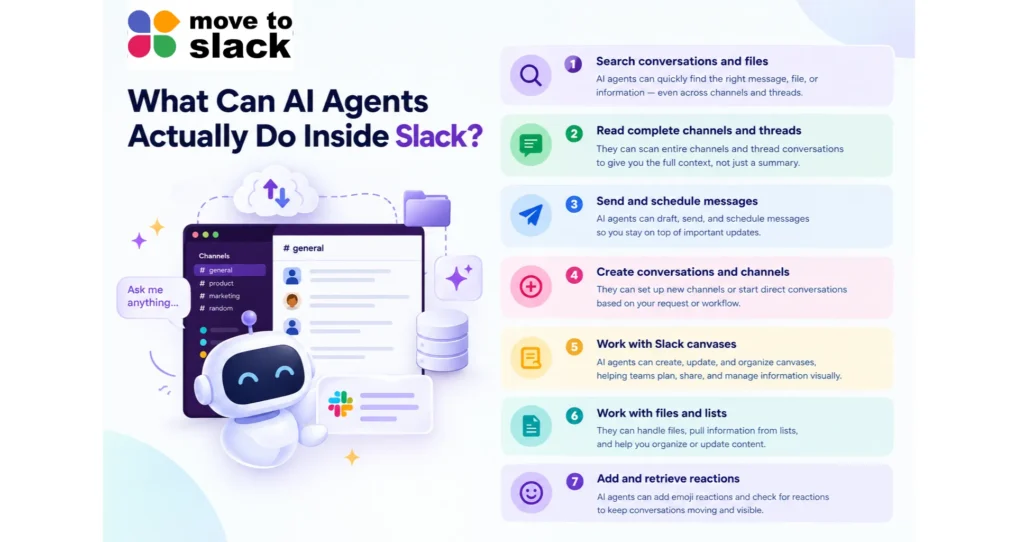
What Can AI Agents Actually Do Inside Slack?
The interesting part of the Slack MCP Server is not just that AI can read Slack. It can also perform actions.
Here are some of the things an AI agent can do through the available MCP tools.
1. Search conversations and files
An AI agent can search Slack messages and files and filter information based on factors such as date, user, or content type.
This means an employee could use an AI client to find a previous discussion, locate a file, or bring together information spread across different conversations.
The Slack MCP Server can also search users, public and private channels, direct messages, group DMs, and other workspace information, depending on the permissions provided.
2. Read complete channels and threads
An agent can retrieve channel history and read complete message threads.
This matters because a single Slack message rarely contains the full story. The decision may have been discussed several messages earlier, followed by questions, answers, and a final update.
With this context available, an AI agent can work with the conversation instead of relying on one isolated message.
3. Send and schedule messages
The Slack MCP Server can also move from reading to action.
AI agents can send messages to Slack conversations and schedule messages for later. They can also draft and preview messages within AI clients before they are sent.
For example, an agent could help prepare a project update based on a conversation and then post it to the relevant channel.
4. Create conversations and channels
The available tools also allow an agent to create a new public or private channel, group DM, or direct conversation on behalf of the authenticated user, subject to the required permissions.
This gives Slack MCP integration a more practical role in workflows where creating a new space for a project or discussion is part of the task.
5. Work with Slack canvases
AI agents can create, update, and read Slack canvases.
That means information does not have to stay inside chat messages. Agents can also help create structured, formatted content that teams can share and continue working on inside Slack.
6. Work with files and lists
The MCP server can retrieve files shared in Slack and also supports file uploads.
It can also work with Slack Lists, including creating and reading lists, updating records, and working with structured columns. These capabilities make the Slack MCP Server useful for more than simple question-and-answer interactions.
7. Add and retrieve reactions
The newer MCP tools also allow AI agents to add reactions to Slack messages and retrieve reactions.
It may sound like a small feature, but it shows how MCP is moving toward more direct interaction with the workspace instead of only using Slack as a source of information.
How Does an MCP Server for Slack Help AI Agents?
AI agents need context to produce useful results. Slack has a large amount of that context because teams already discuss their work there.
Slack says its Real-Time Search API and MCP server give developers secure, flexible access to conversational data. The MCP server provides a unified communication layer that helps LLMs and agents discover information and execute actions while respecting user permissions.
For example, imagine an employee asks an AI agent:
“Why was this customer issue delayed last week?”
Instead of giving a general answer, the agent can search relevant Slack conversations, find the discussion around the issue, understand the decision that was made, and return an answer based on that actual context.
That is where the value of a MCP server for Slack becomes clearer. The AI is not working with information in isolation. It can work with the conversations surrounding the work.
Slack Is Becoming a Place Where Agents Work
Slack’s wider platform direction also shows why the Slack MCP Server matters.
The company says its platform now supports AI apps and agents that can use organisational knowledge while maintaining security and governance. More than 50 industry partners were already building context-aware agents when Slack announced general availability of its Real-Time Search API and MCP server in February 2026.
Slack also reported a 25x increase in both Real-Time Search queries and MCP tool calls since the limited release.
The idea is fairly simple. Instead of asking employees to jump between Slack, CRM systems, project tools, documents, and AI applications, more of those experiences can happen around the conversation where work is already taking place.
Salesforce is taking this idea further through Salesforce-hosted MCP servers that connect Salesforce CRM data, Tableau, Data 360, and AI agents with Slackbot. The goal is to bring business data and business logic into the conversational workflow instead of keeping them locked inside separate browser tabs.
If You Are Moving to Slack
Moving your team to a new collaboration platform can get complicated, but with the right solution, the entire process can become more effortless, organised, and error-free.
Move to Slack is built to make your Slack migration easier to manage, whether you are moving from Microsoft Teams, Google Chat, or another collaboration platform. It helps keep your migration organised from the initial setup to the final move, so your team can transition to Slack without unnecessary confusion or disruption.
You can also get your complete migration timeline instantly with the Move to Slack tool. Just fill in a few details about your current workspace and migration requirements, and a timeline based on your workspace will be generated. It gives you a clear idea of what your migration can look like before you get started, making it easier to plan the move with confidence.
How to Make Your Slack Migration Smoother
- Complete Slack Migration: Move your workspace and important data to Slack with a structured migration process.
- Workspace Setup: Define your workspace requirements and get the migration planned around them.
- Data Migration Support: Move the information your team needs while keeping the transition organised.
- Smooth Transition: Make the move to Slack easier with a clear process from planning to completion.
- 24/7 Support: Get support whenever you need help during your Slack migration.
- Expert Assistance: Get guidance throughout the migration so your team can move forward with less hassle.
If you are ready to migrate to Slack, connect with the team to understand how the Move to Slack simplifies your migration.
Wrapping Up
The Slack MCP Server is changing what AI agents can actually do inside a workplace. They can search conversations, understand threads, retrieve files, send and schedule messages, create channels, work with canvases, and perform other actions through MCP-compatible clients.
For businesses, this makes Slack more than a communication platform. With the right permissions and integrations, it can become a working environment where people and AI agents share context and get things done together.
As more tools connect through MCP, the real value will come from how businesses use that connection. A well-planned Slack MCP integration can help AI work with real team context instead of generic information, while a well-managed migration can give teams a stronger foundation for that future.
Frequently Asked Questions
A Slack MCP Server can reduce time spent searching across conversations and tools, helping AI agents surface relevant context and support faster workplace decisions through connected workflows.
Businesses should review permissions, security policies, approved AI clients, governance requirements, data access, and workflows before implementing Slack MCP integration across their organisation.
A structured Slack migration can create organised channels, accessible information, and consistent workflows, giving teams a stronger foundation for AI-enabled collaboration and future MCP integrations with Move to Slack.
Businesses can manage security by controlling permissions, limiting authorised tools, reviewing access policies, monitoring agent activity, and ensuring AI workflows follow existing organisational governance requirements.
Slack MCP integration does not necessarily require major communication changes, but organisations may need updated governance, AI usage guidelines, permissions, and workflows as agent-based automation becomes more common.