Modern workplaces generate an enormous amount of information every day. Project updates, meeting notes, onboarding documents, action items, and team discussions often end up scattered across multiple tools, making it difficult for employees to find what they need when they need it.
This is one of the reasons why Slack Canvas has gained attention among organizations looking to improve collaboration. Instead of storing information in separate documents and applications, teams can organize important content directly within Slack, creating a more connected and productive work environment.
In this blog, we’ll explore how Slack Canvas works, why businesses are adopting it, and how it helps teams stay organized while improving day-to-day collaboration.
What Is Slack Canvas?
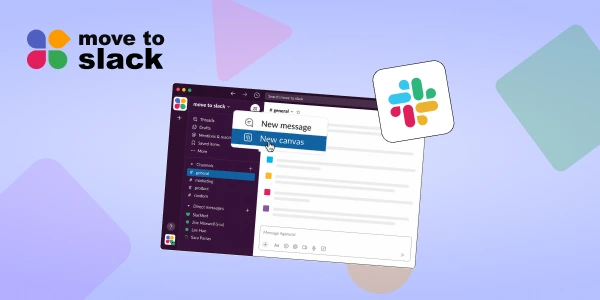
Slack Canvas is a collaborative workspace built directly into Slack that allows teams to organize information alongside conversations.
Rather than searching through long message threads or switching between multiple document platforms, users can create dedicated spaces for project plans, meeting notes, onboarding resources, team updates, and operational documentation.
Every channel and direct message can have its own Slack Canvas, making it easier to keep important information accessible and relevant to ongoing discussions.
For organizations using Slack for teams, this creates a central location where knowledge and communication work together instead of existing separately.
Why Teams Need Better Information Management
Many businesses rely on multiple team communication apps to manage daily operations. While these tools help teams stay connected, they can also create challenges:
- Important information gets buried in chat conversations
- Employees spend time searching for documents
- Project updates are stored across multiple platforms
- New team members struggle to find onboarding resources
- Teams switch between different applications throughout the day
As organizations grow, these small inefficiencies begin affecting productivity.
Slack Canvas helps solve these challenges by bringing conversations, documents, and workflows into a single workspace.
How Slack Canvas Helps Teams Stay Organized and Productive
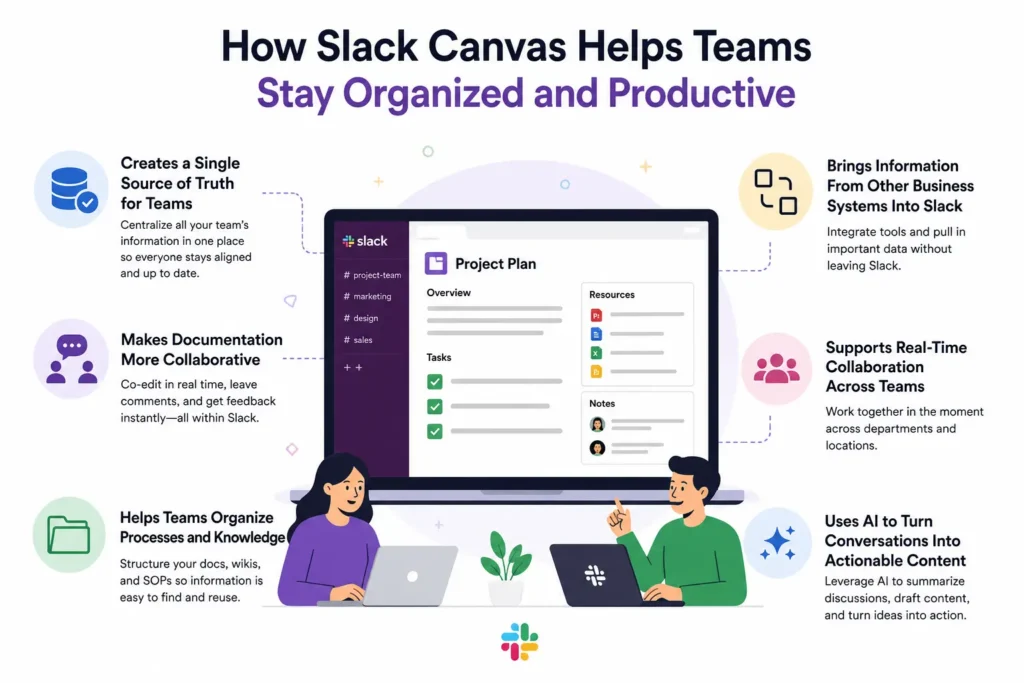
Creates a Single Source of Truth for Teams
One of the biggest challenges in modern workplaces is that information lives everywhere. Project updates may be in chat threads, meeting notes in documents, and important resources in separate applications.
Slack Canvas brings all of this together in one place. Teams can create a dedicated workspace for projects, departments, or channels where important information remains accessible and searchable. Instead of asking the same questions repeatedly, employees can find what they need immediately.
Makes Documentation More Collaborative
Traditional documents often sit outside communication platforms, forcing employees to switch between multiple tools.
With Slack Canvas, teams can create project briefs, meeting notes, action plans, and knowledge resources directly within Slack. Team members can edit content together, leave comments, participate in discussions, and keep documentation updated without leaving the platform.
This makes collaboration much more natural because conversations and documentation stay connected.
Helps Teams Organize Processes and Knowledge
Slack Canvas is designed to help teams capture and organize information that is used repeatedly.
For example, teams can use it to:
- Track action items and project updates
- Store meeting notes and decisions
- Share important links and resources
- Create channel FAQs
- List stakeholders and responsibilities
This reduces confusion and helps everyone stay aligned, especially when multiple teams are working together.
Brings Information From Other Business Systems Into Slack
Another major advantage of Slack Canvas is its ability to connect with external applications.
Teams can add links that automatically display rich previews, embed business information, and surface data from systems such as Salesforce directly inside a canvas. Instead of jumping between multiple platforms, employees can view the information they need within the same workspace.
This reduces context switching and helps teams make decisions faster.
Supports Real-Time Collaboration Across Teams
Slack Canvas is built for collaborative work.
Multiple users can view, edit, comment, and contribute to a canvas at the same time. Teams can even bring a canvas into Slack Huddles to review information together, discuss updates, and make changes in real time.
Whether employees work in the same office or across different time zones, Slack Canvas helps keep everyone aligned around the latest information.
Uses AI to Turn Conversations Into Actionable Content
One of the newest capabilities of Slack Canvas is AI-powered content creation.
Teams can use AI to summarize discussions, brainstorm ideas, draft project plans, and organize information directly from conversations. Instead of manually compiling notes from lengthy discussions, employees can quickly transform conversations into structured content that the entire team can use.
This helps teams spend less time documenting work and more time moving projects forward.
Workflow Automation and Migration to Slack
Slack Canvas is not only a documentation workspace, but it also supports workflow automation.
Organizations can embed no-code workflows directly into a canvas, allowing employees to complete tasks without leaving Slack. Whether it’s submitting an IT request, onboarding a new employee, requesting equipment, or initiating approvals, workflows can be accessed alongside the information people need to complete them.
This becomes especially valuable for businesses migrating from Microsoft Teams, Google Chat, Discord, or other team communication apps.
During a Microsoft Teams to Slack migration or Google Chat to Slack migration, organizations often face challenges around scattered documentation, disconnected knowledge bases, and inconsistent processes. Slack Canvas helps solve this by providing a centralized location where teams can organize information, automate common tasks, and maintain operational consistency.
To simplify the transition, organizations can use smart solutions like Move to Slack to migrate channels, conversations, users, and historical data from Microsoft Teams, Google Chat, and other collaboration platforms.
Combined with Slack Canvas, businesses can create a structured and productive workspace from day one, helping employees adapt faster while keeping important information organized.
Conclusion
As workplaces become increasingly digital, finding information quickly is just as important as communication itself.
Slack Canvas helps organizations centralize knowledge, reduce app switching, improve collaboration, and keep important information connected to everyday conversations. Instead of managing documents separately from discussions, teams can work from a shared workspace that supports both communication and execution.
For businesses adopting Slack for teams or planning Teams to Slack migration projects, Slack Canvas offers a practical way to improve organization and productivity while creating a more connected employee experience.
Frequently Asked Questions
Slack Canvas helps teams keep project updates, meeting notes, action items, and resources in one place within Slack. This reduces time spent searching for information, minimizes context switching, and helps employees stay focused on their work.
For many teams, Slack Canvas can serve as a centralized workspace for operational documentation, project plans, onboarding resources, and knowledge sharing. Since it exists directly within Slack, teams can collaborate on content without constantly switching between separate document platforms.
Slack Canvas enables team members to collaborate on shared information in real time, regardless of location. Employees can access project details, meeting notes, responsibilities, and updates from a single workspace, helping distributed teams stay aligned.
Yes. During a Teams to Slack migration, Slack Canvas helps organizations organize knowledge, document processes, and centralize important resources. It provides a structured workspace that makes it easier for employees to adapt to Slack while keeping information accessible.
Yes. Organizations can migrate their complete Teams workspace, including channels, users, files, chats, and historical conversations, to Slack. Tools like Move to Slack help simplify the migration process, ensuring important information is retained and teams can transition smoothly to their new Slack environment.