Your Slack workspace has grown, and now things are starting to feel a little crowded. More teams, more conversations, more shared knowledge, and suddenly finding that one important message from months ago feels like searching for a needle in a huge room.
If you are planning to move from a standard workspace to a bigger environment, this guide is for you. A Slack to Slack migration is not only about transferring data, it is about making sure your teams, conversations, and important business information move safely along with it.
But here is the thing, migration can look easy from the outside. Behind the scenes, there are many small details like users, channels, messages, permissions, and settings that need attention. Miss one important piece, and things can get confusing pretty quickly.
Why Businesses Move from Standard Workspaces to Enterprise Grid
A growing business cannot always manage everything inside a single workspace forever. At some point, teams need more control, better organization, and a structure that can support different departments without making everything messy.
This is where a Slack enterprise grid migration becomes useful. Instead of handling separate workspaces individually, businesses can bring everything into a connected Enterprise Grid environment where teams can collaborate better and administrators can manage things more easily.
Businesses usually consider this move because they want to:
- Manage multiple teams and departments in a better way
- Maintain better control over workspace settings
- Support a larger number of users
- Keep important conversations available after migration
- Create a more organized collaboration environment
Understanding the Slack Migration Process
The Slack migration process is not just about moving data from one workspace to another and hoping everything works fine. It looks simple from outside, but once you actually start looking into users, conversations, channels, permissions, files, etc. then you realize there are many small things that need attention.
Every workspace has its own setup, team structure, and years of conversations stored inside it. Therefore, a proper migration needs a little planning first, because nobody wants to finish the move and then discover something important is missing.
A successful migration usually focuses on a few important areas.
Managing Users Without Confusion
Users are the heart of any workspace. If user accounts are not handled properly, teams can face access issues, duplicate accounts, or confusion after the migration.
Therefore, businesses need to review user details before starting the migration, and make sure everyone can access the right workspace without unnecessary trouble.
Moving Channels and Conversations
Channels are where most company discussions happen. Project updates, customer conversations, team decisions, and important information are usually sitting there for months or even years.
During a Slack to Slack migration, moving public channels, private channels, and conversation history properly helps teams continue their work without searching for lost information everywhere.
Keeping Files and Shared Information Available
Messages are not the only valuable thing inside Slack. Teams also share files, important documents, and useful resources through conversations.
Additionally, making sure these shared resources move properly helps employees find the information they need without asking everyone, “Hey, does anyone still have that file?”
Managing Workspace Settings and Permissions
Every workspace follows its own rules. Some teams have different access levels, specific permissions, and unique settings based on their requirements.
During a Slack workspace migration, reviewing these configurations before moving helps maintain the same working experience after the migration is completed.
Handling User Matches and Account Conflicts
Sometimes, user accounts between workspaces do not match perfectly. Different email addresses or similar account details can create small problems during migration.
Therefore, checking account matches and resolving conflicts before completing the move helps keep user access clean and organized.
Validating Everything After Migration
The migration is not really complete when the data finishes moving. The final step is checking that everything is available and working properly.
Teams should review channels, messages, users, files, etc. after migration. Additionally, this small checking step saves a lot of confusion later because nobody wants to find missing information weeks after the move.
What Data Can Be Migrated During the Process?
One common question businesses have is, what exactly moves during migration?
The answer depends on the migration approach and tools being used. However, important workspace information can usually be transferred to help teams continue their work without starting again from zero.
Some commonly migrated data includes:
- Workspace members and user information
- Public and private channels
- Channel and direct message history
- Files shared within conversations
- Apps, custom integrations, and webhooks
- Custom emojis
- Salesforce-connected features like Salesforce channels, Agentforce, and Sales Home
- Workspace roles and access settings
Additionally, user profiles can be merged based on migration settings, so teams can maintain their identity and continue collaboration smoothly after the move.
Therefore, with proper planning and the right migration approach, businesses can carry their valuable workspace knowledge forward instead of leaving everything behind.
What Is the Best Way to Complete a Slack Migration?
Managing a large Slack migration process manually can become complicated very quickly. At first, it may look manageable, but when thousands of messages, users, and channels come into the picture, things can become a little overwhelming.
This is where using an advanced migration tool makes the journey much smoother. Instead of checking every small detail manually, businesses can use automation to handle complex migration requirements.
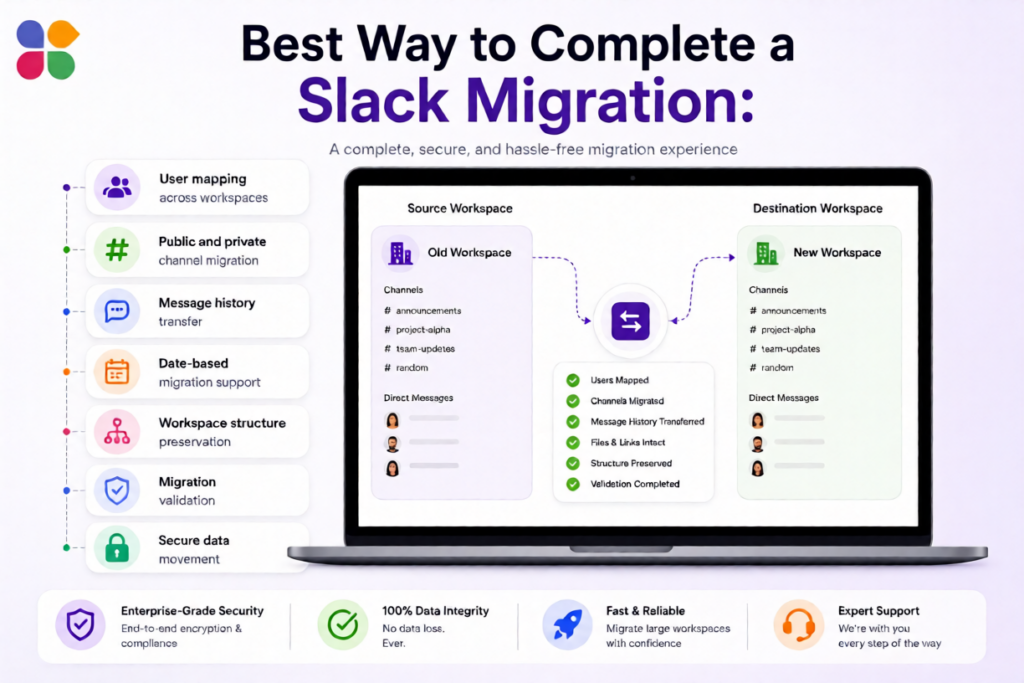
Move to Slack, is a well know Slack migration tool that helps organizations to move entirely from their current platform to Slack, with capabilities like:
- User mapping across workspaces
- Public and private channel migration
- Message history transfer
- Date-based migration support
- Workspace structure preservation
- Migration validation
- Secure data movement
With Move to Slack, organizations can complete a Slack enterprise grid migration in a more organized way, therefore helping teams continue their work with fewer interruptions.
Benefits of Choosing the Right Migration Approach
The right migration approach does more than just move data. It helps businesses maintain confidence during the transition, because nobody wants a migration that creates more problems than solutions.
With the right solution like Move to Slack, businesses can achieve:
- Smoother movement between Slack environments
- Better control over workspace data
- Less manual migration effort
- Accurate transfer of important information
- Easier user transition after migration
- A better foundation for future growth
Moreover, when businesses plan their Slack enterprise grid migration properly, they can focus more on collaboration and less on fixing migration-related issues.
Conclusion
Moving from a standard workspace to Enterprise Grid is a big step for organizations that are growing and need a better way to manage collaboration. A successful Slack to Slack migration helps businesses keep their important conversations, maintain productivity, and create a more structured working environment.
Whether you are planning a Slack migration or looking for a smoother Slack workspace migration, the right process and tools can make the difference. Move to Slack helps businesses handle complex migrations with better accuracy, secure data movement, and a smoother transition, so teams can continue working without unnecessary disruption.
Frequently Asked Questions
Yes, organizations can migrate from standard Slack workspaces to Enterprise Grid when they need centralized administration, improved organization, and support for growing teams across multiple departments.
Yes, businesses can use phased Slack migration strategies to move selected teams or workspaces progressively. Move to Slack supports structured migrations, allowing organizations to validate results before broader deployment begins.
Duplicate accounts should be identified and mapped before migration to prevent access confusion. Move to Slack supports user mapping, helping organizations organize account matches during complex Slack workspace migrations.
Historical messages can remain accessible when supported by the selected migration approach and configured correctly. Careful validation ensures teams can locate important conversations after moving into Enterprise Grid.
Businesses should review users, channels, messages, files, permissions, and integrations after migration. Move to Slack supports migration validation, helping organizations identify discrepancies before fully relying on the new environment.