Choosing a collaboration app sounds easy until the team actually has to choose one. Then suddenly, everyone has an opinion, someone wants Teams, someone else wants Slack, and somebody is already asking, “But what about Google Chat?”
That is where Slack vs Teams vs Google Chat becomes a useful comparison, because all three can handle daily communication, but they do not really work in the exact same way.
So, if you are trying to figure out which one feels better for everyday conversations, files, meetings, integrations, and just getting work done without clicking around everywhere, this guide is for you.
Slack vs Teams vs Google Chat: The Key Differences
Before getting into the small details, here is the quick picture. Slack is built around flexible channels, integrations, workflows, and conversations. Teams fits naturally with Microsoft 365, while Google Chat makes the most sense for teams already living inside Google Workspace.
| Feature | Slack | Microsoft Teams | Google Chat |
|---|---|---|---|
| Daily communication | Channels, threads, DMs, huddles | Chats, channels, meetings | Spaces, threads, DMs |
| App integrations | 2,600+ apps | Strong Microsoft 365 ecosystem | Strong Google Workspace ecosystem |
| Meetings | Huddles and screen sharing | Strong meeting and calling features | Google Meet integration |
| Automation | Workflow Builder and connected apps | Microsoft Power Automate | Google Workspace automation |
| Search | Search across conversations, files, and connected apps | Search across Teams and Microsoft content | Search across Chat messages and files |
| External collaboration | Slack Connect | Microsoft collaboration tools | Google Workspace sharing |
| Best fit | Teams using many different tools | Microsoft 365-focused businesses | Google Workspace-focused teams |
| Pricing approach | $7.25–$15/user/month | $99.99–$199.99/year | $7–$22/user/month |
Pricing and included features can change by plan, so it is worth checking the current plans before making a final decision. Slack currently lists Pro at $7.25 per active user/month when billed annually and Business+ at $15 per user/month annually.
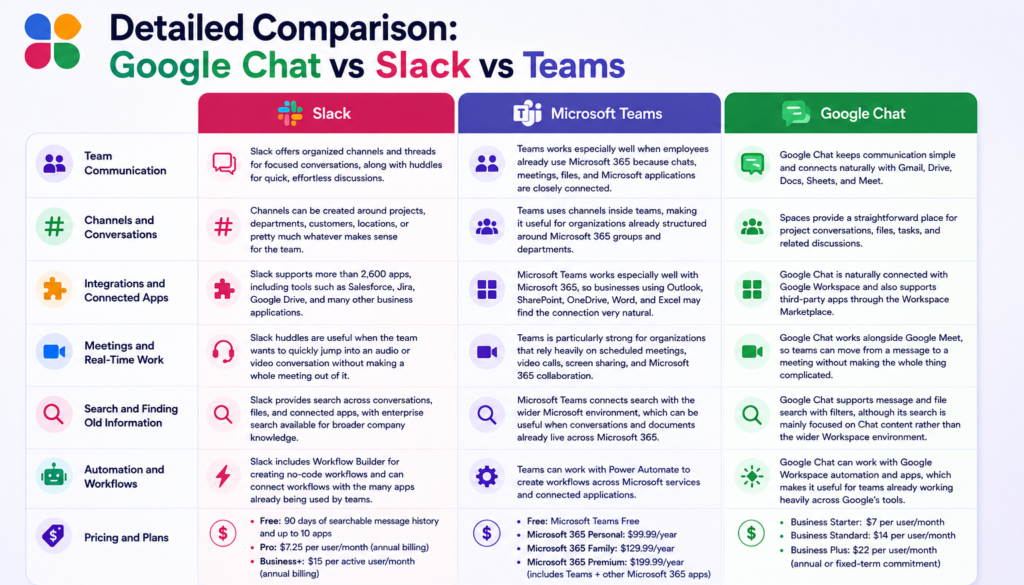
Detailed Comparison: Google Chat vs Slack vs Teams
The table gives you the quick answer, but daily work is not really a table, is it? People message, share files, search for that one conversation from three months ago, jump into a meeting, and somehow do all of this at the same time.
So, here are the areas where the differences actually start becoming noticeable.
Team Communication
When comparing Slack vs Teams vs Google Chat, team communication differs in structure and flexibility. Slack offers organized channels and easy collaboration, while Teams and Google Chat work closely with Microsoft 365 and Google Workspace.
Slack:
Slack keeps conversations around channels and threads, which makes it easier to separate projects, teams, topics, and random-but-important discussions. It also gives teams huddles when a quick conversation is easier than typing 47 messages.
Teams:
Teams works especially well when employees already use Microsoft 365 because chats, meetings, files, and Microsoft applications are closely connected.
Google Chat:
Google Chat keeps communication simple and connects naturally with Gmail, Drive, Docs, Sheets, and Meet, which is pretty convenient if Google Workspace is already the centre of everything.
Channels and Conversations
In Slack vs Google Chat, the difference becomes more obvious when teams have lots of ongoing conversations. Slack is designed around channels and flexible collaboration, while Google Chat uses Spaces with threads and tasks.
Slack:
Channels can be created around projects, departments, customers, locations, or pretty much whatever makes sense for the team.
Teams:
Teams uses channels inside teams, making it useful for organizations already structured around Microsoft 365 groups and departments.
Google Chat:
Spaces provide a straightforward place for project conversations, files, tasks, and related discussions.
Integrations and Connected Apps
This is where things get interesting, because modern teams rarely work inside one application only.
Slack:
Slack supports more than 2,600 apps, including tools such as Salesforce, Jira, Google Drive, and many other business applications.
Teams:
Microsoft Teams works especially well with Microsoft 365, so businesses using Outlook, SharePoint, OneDrive, Word, and Excel may find the connection very natural.
Google Chat:
Google Chat is naturally connected with Google Workspace and also supports third-party apps through the Workspace Marketplace.
Meetings and Real-Time Work
When comparing Google Chat vs Teams, meetings become one of those areas where the surrounding ecosystem matters quite a lot.
Slack:
Slack huddles are useful when the team wants to quickly jump into an audio or video conversation without making a whole meeting out of it.
Teams:
Teams is particularly strong for organizations that rely heavily on scheduled meetings, video calls, screen sharing, and Microsoft 365 collaboration.
Google Chat:
Google Chat works alongside Google Meet, so teams already using Google Calendar and Meet can move from a message to a meeting without making the whole thing complicated.
Search and Finding Old Information
You know that moment when someone says, “We discussed this somewhere last year.” And then everyone starts searching.
Slack:
Slack provides search across conversations, files, and connected apps, with enterprise search available for broader company knowledge.
Teams:
Microsoft Teams connects search with the wider Microsoft environment, which can be useful when conversations and documents already live across Microsoft 365.
Google Chat:
Google Chat supports message and file search with filters, although its search is mainly focused on Chat content rather than the wider Workspace environment.
Automation and Workflows
This is becoming a much bigger part of collaboration tools now. Teams do not only want somewhere to talk, they want the repetitive little things to happen automatically.
Slack:
Slack includes Workflow Builder for creating no-code workflows and can connect workflows with the many apps already being used by teams.
Teams:
Teams can work with Power Automate to create workflows across Microsoft services and connected applications.
Google Chat:
Google Chat can work with Google Workspace automation and apps, which makes it useful for teams already working heavily across Google’s tools.
Pricing and Plans
Pricing can make the decision a little messy because you are not always comparing only the chat application. Sometimes you are also comparing the ecosystem that comes with it.
Slack:
Slack has a free plan with 90 days of searchable message history and up to 10 apps. Its Pro plan priced at $7.25 per user/month on annual billing, while the Business+ plan costs $15 per active user/month when billed annually.
Teams:
Microsoft Teams offers a Free plan, while its paid Microsoft 365 options start with Personal at $99.99/year and Family at $129.99/year.
For users looking for more features, Microsoft 365 Premium is priced at $199.99/year and includes Teams along with other Microsoft 365 apps and services.
Google Chat:
Google currently offers Business Starter for $7 per user/month, Business Standard for $14, and Business Plus for $22, based on an annual or fixed-term commitment.
So yes, pricing depends on what your business is already paying for, what employees actually use, and how many extra tools you would otherwise need.
Which App Is the Best Choice?
There is no universal winner, because a company living inside Microsoft 365 may naturally lean toward Teams, while a Google Workspace-heavy business may find Google Chat easier.
But for businesses that want a flexible collaboration hub with a large app ecosystem, strong channels, automation, external collaboration, and a more open approach to connected tools, Slack stands out.
That is also why Microsoft Teams vs Slack can become an interesting decision for companies that have outgrown a collaboration setup that feels too tied to one ecosystem. Slack supports more than 2,600 integrations and offers Workflow Builder, Slack Connect, channels, huddles, and AI features across its paid plans.
Recent 2026 comparisons also continue to show the same practical split: Google Chat is especially convenient for Google Workspace users, while Slack is stronger for teams wanting a broader, more flexible collaboration hub.
Moving to Slack Without Making It a Huge Project
So, you have compared everything, and you might decide to migrate to Slack. Now comes the part nobody is as excited about: the migration itself.
A proper Slack migration process needs planning around users, channels, messages, files, permissions, workspace settings, and the structure of the new environment. It is not just “move everything and hope for the best.”
The Slack migration timeline can also depend on the amount of information being moved and the size of the workspace, so planning the move properly helps teams avoid unnecessary disruption.
Migrating to Slack With Move to Slack
This is where Move to Slack can make the process much easier. Instead of making your internal team handle every little migration task manually, the tool is designed to help businesses move their workspace data into Slack in a more organized way.
And honestly, when there are years of conversations and files involved, having a proper migration tool is much better than keeping ten spreadsheets open and hoping nobody missed anything.
With Move to Slack, businesses can focus on:
- Workspace-to-workspace migration
- Structured data transfer
- User and channel mapping
- Message and file migration
- Migration planning and monitoring
- Less manual migration work
- Better control over the overall migration
For businesses planning a Slack migration timeline, having a structured migration approach also makes it easier to plan downtime, communicate with employees, and keep the move organized.
Conclusion
The Slack vs Teams vs Google Chat discussion does not really have one answer for every company.
Teams makes a lot of sense for Microsoft 365-heavy organizations. Google Chat is a natural choice for teams already deep into Google Workspace. Slack, meanwhile, gives businesses a flexible collaboration environment where conversations, applications, automation, and external collaboration can all sit together.
And if your final decision is to Migrate to Slack, the next thing to think about is not only where you are going, but how you are going to get there.
The right migration keeps your business moving forward while bringing your communication history along with it.
Frequently Asked Questions
Slack often suits cross-functional teams needing flexible channels, extensive integrations, automation, and external collaboration across different tools. Move to Slack can simplify the transition when teams prioritize flexibility and scalability.
Compare existing productivity suites, meeting habits, integrations, search needs, and external collaboration requirements. Move to Slack helps organizations transition when flexibility, connected tools, and scalable collaboration become priorities for growth.
Review users, channels, messages, files, permissions, integrations, retention requirements, and workspace structure. Move to Slack can support planning, mapping, transfer, validation, and monitoring for controlled migration requirements.
Timing depends on workspace size, data volume, complexity, permissions, and validation requirements. Move to Slack can help teams organize migration phases and reduce avoidable manual work during transitions.
Plan communications, user mapping, permissions, data validation, testing, and phased execution before launch. Move to Slack provides a structured approach that helps teams manage migration with fewer manual tasks effectively.