Choosing a workplace chat tool used to feel pretty simple. You picked the one your team liked, created some channels or groups, and everyone got back to work.
Now, not really. Modern teams are asking much more from collaboration tools. They want communication, automation, integrations, search, AI features, security, and all those little things that decide whether people actually enjoy using the platform or keep finding ways around it.
That is where the Slack vs Google Chat conversation becomes interesting. Both can support everyday communication, but the way they handle collaboration, integrations, automation, pricing, and growing teams is not exactly the same.
So, if you are stuck between the two, this guide is for you. We are comparing essential areas and also looking at what recent research says about productivity, because choosing a chat app only because it looks nice is probably not the best business strategy.
What Recent Research Says About Workplace Productivity
Before comparing the platforms, there is something worth looking at.
According to Gartner research published in March 2025, only 23% of digital workers were completely satisfied with their workplace applications, while workers satisfied with their applications were nearly three times more likely to report being much more productive.
That is a pretty interesting number, because it shows that productivity is not only about adding more tools. The tools need to actually work for the people using them.
And this is where Slack vs Google Chat becomes more than a feature comparison. If employees cannot find conversations, connect their everyday tools, or quickly get the information they need, having another collaboration app does not magically fix the problem.
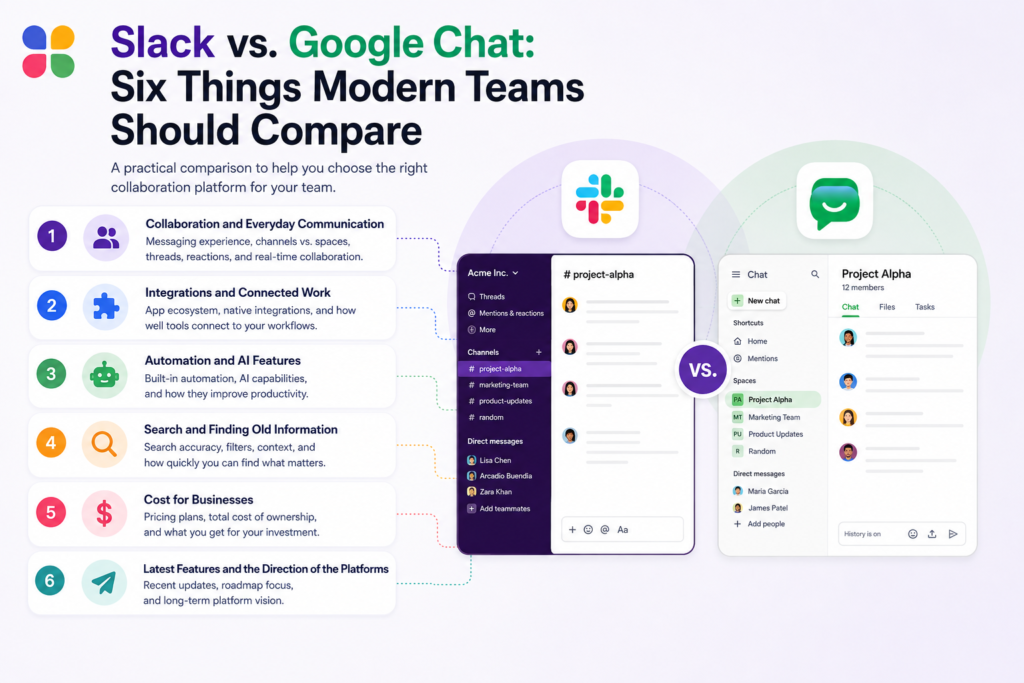
Slack vs Google Chat: Six Things Modern Teams Should Compare
Collaboration and Everyday Communication
Slack is built around channels, where teams can create dedicated spaces for projects, departments, customers, or specific topics. Public and private channels help teams keep conversations organized instead of putting everything into one giant chat.
Google Chat also provides spaces for team conversations and works naturally alongside Google Workspace. This can be convenient for companies already spending most of their day inside Gmail, Drive, Docs, and Meet.
The difference is more about how your team likes to work. Slack puts a lot of emphasis on channels, connected apps, and keeping work conversations together, while Google Chat feels more natural when communication already sits inside the Google ecosystem.
Integrations and Connected Work
This is one area where Slack has a very large playground.
Slack currently offers more than 2,600 apps through its App Directory, including Salesforce, Jira, Google Drive, and many other business tools.
Google Chat has a strong advantage when the business already depends heavily on Google Workspace. Files, meetings, calendars, and other Google services are already close by, so employees do not need to jump between completely different environments.
For businesses with a wider and more mixed technology stack, Slack can feel more flexible because the collaboration platform can sit in the middle of many different applications.
Automation and AI Features
Modern productivity is moving toward automation, and both platforms are adding more intelligent features.
Slack has continued adding AI-powered workflows, search, recaps, file summaries, and automation. Its Workflow Builder can create automated processes without requiring users to write code, and Slack says its customers have seen a 28% increase in time saved through automation in its cited customer success research.
Google has also been putting more AI into Workspace. In 2025, Google started including new AI features across Business and Enterprise Workspace subscriptions, with availability depending on the edition.
So when looking at Slack vs Google Chat, the question is not really whether either platform has AI. They both do. The bigger question is where your employees already work and which platform makes those automated actions easier to use every day.
Search and Finding Old Information
Then suddenly search becomes everybody’s favourite feature.Slack keeps messages, files, and conversations searchable on its paid plans, and its current plans also include AI search and conversation summaries at different levels.Google Chat benefits from being connected to the wider Google Workspace environment, so teams already using Drive and other Google services can keep information close to the rest of their work.
For knowledge-heavy teams, this matters a lot. Old conversations are not just old conversations. They can contain decisions, customer information, project context, and answers that nobody wants to recreate again.
Cost for Businesses
Cost is where the comparison gets a little less exciting but definitely more important.
Google Workspace can be attractive for businesses already paying for Gmail, Drive, Docs, Meet, and other Workspace services because Chat comes as part of that broader subscription.
Google currently lists Business Starter at $7 per user per month on an annual or fixed-term plan, Business Standard at $14, and Business Plus at $22.
Slack has its own subscription structure. Its Pro plan comes at $7.25/user/month (annual billing), and the Business+ plan is currently listed at $15 per active user per month when billed annually.
Therefore, the cheaper option is not always obvious. When comparing Google Chat vs Slack, businesses also need to consider whether they are already paying for Google Workspace or need Slack’s wider collaboration ecosystem.
Latest Features and the Direction of the Platforms
This is another area businesses should not ignore.
Slack has been adding more AI, automation, search, and workspace management capabilities, while also changing how features are organized. In July 2026, Slack introduced updates including scheduled statuses, temporary public-channel access, and expanded Slackbot analytics for Business+ customers.
Google is also continuing to bring AI deeper into Workspace, which means Google Chat is not sitting still either.
Gartner’s 2025 research found that more than 20% of digital workplace applications are expected to use AI-driven personalization algorithms by 2028. The same research found that only 23% of digital workers were completely satisfied with their work applications in 2024.
That tells us something pretty clearly. The future is not just about having a chat box. It is about making the workplace feel easier to use, more connected, and more useful.
Slack vs Google Chat: Which App Is Best for Your Business?
There is no single winner for every company. And honestly, that would make this comparison too easy. A practical Google Chat vs Slack comparison should therefore start with how your teams communicate and which tools they already use every day.
Choose Google Chat If Your Business Already Lives in Google Workspace
Google Chat can make a lot of sense when Gmail, Drive, Docs, Meet, and other Google services are already part of everyday work.
You may prefer it if:
- Your team already uses Google Workspace heavily
- Most collaboration happens around Google files and meetings
- You want communication inside your existing Google environment
- Keeping the number of separate workplace applications smaller matters
In that situation, adding another communication platform may simply create one more place for employees to check.
Choose Slack If Collaboration Goes Beyond Simple Messaging
Slack becomes especially interesting when teams need more than conversations.
You may prefer Slack if:
- Your teams work across many different business applications
- You need a large integration ecosystem
- Automation is an important part of daily work
- You want conversations organized around projects and teams
- Your business works with customers, vendors, or external partners
- Searchable workplace knowledge is important
Slack currently supports more than 2,600 apps, while its Workflow Builder can connect with tools such as Salesforce, Jira, and Google Sheets.
For companies that want collaboration to become part of the wider workflow, Slack can therefore be the more natural choice.
Moving From Google Chat to Slack Without Leaving Your Work Behind
Deciding to migrate to Slack is one thing. Moving years of conversations, files, channels, users, and other workplace information is a completely different story.
A proper Slack migration process needs planning because the information inside a collaboration platform is usually much bigger than people realise. There are messages, threads, attachments, users, channels, and all those old conversations that suddenly become very important when someone needs them.
That is where a dedicated migration tool can make the process much easier.
Move to Slack Makes the Migration More Manageable
Move to Slack is a solution that is designed to move workplace data into Slack while keeping important structures and relationships together.
The platform migrated complete data with 99.98% data-match accuracy. It also supports messages, threads, files, users, channels, groups, and direct messages.
The process is basically built around three stages:
- Select the source platform
- Map users, channels, and data
- Transfer the information securely to Slack
Move to Slack also states that it uses a zero-retention approach, meaning migration data is not stored on its servers, while its architecture supports permission management and secure transfers.
So, if the decision is to move forward, the migration should not become another giant project where everyone is manually copying things and hoping nothing important gets forgotten. That would be a little ironic, honestly.
Conclusion
Slack vs Google Chat is not really a question of which application has more buttons or which one looks better on the screen.
It comes down to how your people actually work.
Looking at Google Chat vs Slack from that perspective makes the decision less about features and more about finding the platform that fits the way your business actually operates.
Google Chat can be a strong fit for organizations already deeply connected to Google Workspace, while Slack can make more sense for businesses looking for broader integrations, automation, searchable conversations, and a more connected collaboration environment.
And if you decide to migrate to Slack, the move itself deserves just as much attention as the platform decision. With a structured Slack migration process and a tool such as Move to Slack, businesses can bring their important workplace information along instead of starting from an empty workspace.
Because moving to a new collaboration platform should mean getting a better way to work, not losing the work you already spent years creating.
Frequently Asked Questions
Slack can improve productivity through organized channels, integrations, automation, and searchable conversations, while Move to Slack supports teams transitioning workplace data without disrupting established workflows.
Slack can be better for teams needing broader integrations, organized channels, automation, and searchable workplace knowledge, while Move to Slack helps businesses transition when they choose Slack.
Companies can simplify Slack migration by mapping users and channels, validating transferred data, and communicating changes early. Move to Slack can reduce manual work during the transition.
The Slack migration process depends on data volume, workspace complexity, users, channels, and requirements. Move to Slack can help streamline transfers through structured mapping, migration, and validation.
Businesses may need to move messages, threads, files, users, channels, groups, and direct messages. Move to Slack helps preserve important workplace context during the migration instead of leaving historical information behind.