
Moving to a new collaboration platform sounds easy until the real checklist appears.
Messages, files, users, channels, permissions, and years of conversations are sitting there. Suddenly, the migration feels much bigger than just clicking a button and moving everything.
That is why enterprise Slack migration needs proper planning before anything starts. Hours of preparation, the right checklist, and a clear migration strategy can save businesses from those unexpected “where did this go?” moments later.
In this blog, we will cover the important migration checklist businesses should follow, what to prepare before moving, and how the right approach can make the entire transition smoother.
Enterprise Slack Migration Checklist
Before scheduling any migration date, every business should make sure the important preparation work is already complete. Most migration delays happen because planning was incomplete, not because the migration itself failed.
Audit Everything Inside Your Existing Workspace
The first step is understanding exactly what exists today.
Many organizations begin migrating without knowing how many private channels, guest users, inactive workspaces, connected apps, or archived conversations they actually have. That usually creates confusion halfway through the project.
A proper audit should include:
- Public and private channels
- Direct messages and group conversations
- Active and inactive users
- Guest accounts
- Shared files
- Emojis
- Connected applications
- Bots and automation
- Third-party integrations
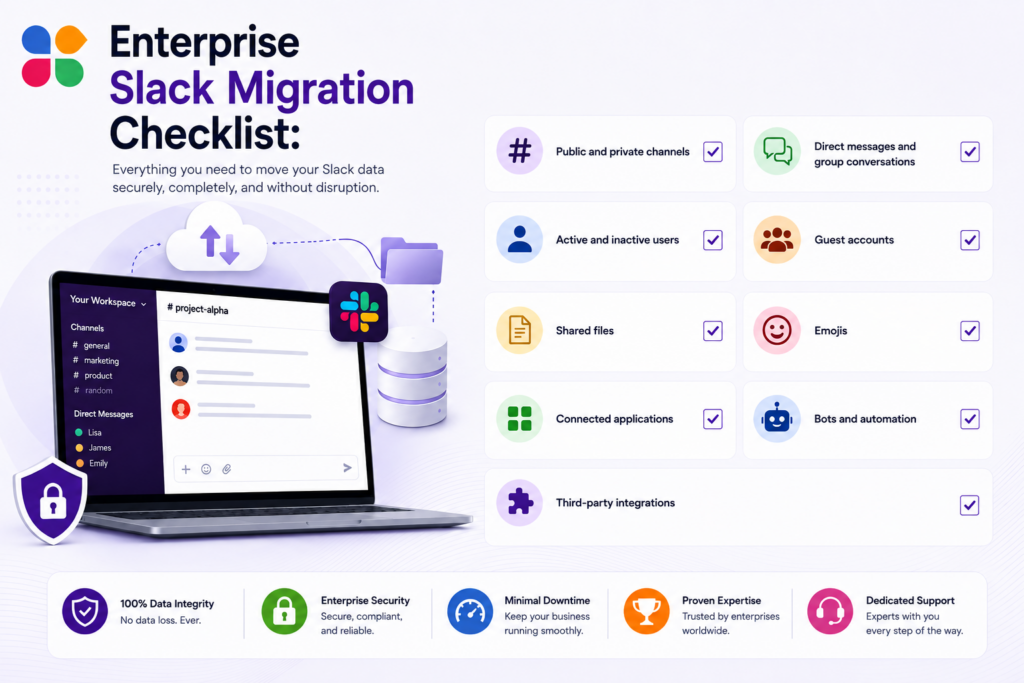
This simple review gives IT teams a much clearer picture of what actually needs to move during the Slack migration process instead of migrating unnecessary data.
Configure Single Sign-On Before Migration
Authentication should never be left for the last day.
If your organization uses SSO, make sure it is configured correctly before migration begins. Matching your identity provider with employee email domains helps users sign in immediately after migration without duplicate accounts or unnecessary login issues.
It is also worth testing user access with a small group before migrating everyone. That little test often catches small configuration issues early, which honestly saves quite a bit of stress later.
Verify User Matching Before Moving Data
One of the biggest reasons enterprise migrations become messy is incorrect user mapping.
When planning Slack data migration, every existing user should be reviewed carefully. If identical email addresses already exist in Slack, those accounts can usually be merged. When email addresses are different, administrators should manually review those users before approving the migration.
A proper user verification helps preserve:
- User profiles
- Message ownership
- Channel memberships
- Historical conversations
- User permissions
Without this review, conversations may appear under the wrong users, making future searches much more confusing than they should be.
Resolve User Conflicts Before Approving Migration
Not every account matches perfectly.
Employees change departments, companies change email domains, contractors become full-time employees, and even older accounts sometimes remain active even after years.
Before starting Microsoft Teams to Slack migration or switching from Google Chat to Slack, review every conflicting account individually and decide whether it should be merged, replaced, archived, or migrated separately.
Taking time here feels slightly boring, maybe. But it is still much easier than correcting thousands of migrated conversations afterward.
Review Security and Workspace Settings
Every collaboration platform has its own workspace rules.
Before you migrate to Slack, compare the security settings of your existing platform with your new Slack environment. Small differences in permissions can affect how users collaborate after migration.
Some important settings worth reviewing include:
- Guest access policies
- External sharing permissions
- Channel creation permissions
- Workspace administration
- Data retention policies
- Compliance requirements
Additionally, reviewing these settings before migration helps avoid unexpected permission changes once employees begin using the new workspace.
Decide Exactly What Needs to Be Migrated
This is probably one of the most overlooked steps.
Many businesses simply decide to migrate everything. Then halfway through the project they realize thousands of inactive channels, duplicate files, and years of unnecessary conversations are increasing migration time without adding much value.
Instead, define the migration scope clearly. For example, decide whether you need:
- Complete message history
- Selected date ranges
- Active users only
- Archived channels
- Private conversations
- Files and attachments
- Compliance-related records
Planning the scope early keeps the Slack migration process much smoother while helping teams avoid transferring information that nobody really uses anymore.
Review Connected Business Applications
Enterprise collaboration platforms rarely work alone.
CRM platforms, project management software, cloud storage, HR systems, approval workflows, reporting dashboards, customer support platforms, and many other business applications are usually connected with workplace communication.
Before migration starts, prepare a complete list of these integrations and confirm:
- Whether Slack supports them
- Whether reauthorization is required
- Whether existing permissions remain unchanged
- Whether workflow automation needs updating
This review becomes even more important for businesses that rely heavily on automated notifications across departments because one disconnected integration can quietly interrupt everyday work without anyone noticing immediately.
Prepare Employees Before Migration Day
Technology can do a lot, but people still need to know what is happening.
One mistake many businesses make is telling everyone about the migration just a few hours before it starts. That usually leads to confusion, support tickets, and messages like, “Why can’t I open my workspace?” which nobody enjoys answering on a busy day.
Instead, give employees enough information beforehand. Let them know:
- When the migration starts
- How long it may take
- Whether there will be temporary downtime
- How they will sign in afterward
- Where they can ask for help if something feels different
A simple communication plan makes the whole experience much smoother for everyone.
Schedule the Migration at the Right Time
The best migration is usually the one that interrupts business the least.
Large enterprise workspaces can take several hours to complete depending on the amount of data being transferred. Because of that, many organizations schedule migrations during weekends, holidays, or outside normal business hours.
It is also a good idea to avoid periods when major projects, product launches, or company-wide meetings are already planned. Timing may sound like a small detail. Actually, it can make a huge difference.
Know What Happens During the Migration
Once the migration starts, there are a few things businesses should expect.
The migrating workspace may become temporarily unavailable while data is being transferred. Existing enterprise users usually continue working, while direct messages and conversation history are migrated in the background.
Additionally, members normally receive notifications before the migration begins, followed by another notification once everything has finished successfully.
For larger organizations, patience matters here. Some enterprise migrations naturally take longer because millions of messages, files, and channel activities need to be processed carefully.
Verify Everything After the Migration
Migration should never end with, “Looks fine.”
Once the process is complete, spend some time validating the new workspace before asking everyone to continue working normally.
Things worth checking include:
- Message history
- Private and public channels
- File attachments
- Threaded conversations
- User permissions
- Apps and integrations
- Custom emoji
- Channel memberships
A proper review helps confirm that the Slack migration completed successfully and nothing important was left behind.
Review Profiles, Workspace Roles, and Access
After migration, some profile information may change depending on how user accounts were merged during preparation.
Workspace owners should also verify role assignments, workspace ownership, guest permissions, and overall access settings before reopening everything to employees.
It is also worth confirming that redirected workspace URLs, login methods, and Single Sign-On authentication all work exactly as expected.
That little review usually takes only a short time, but it gives everyone much more confidence before daily work begins again.
The Smarter Way to Handle Enterprise Slack Migration
Planning a migration internally is possible, of course. But when enterprise workspaces contain years of conversations, private channels, files, integrations, compliance requirements, and thousands of users, businesses usually need a solution built specifically for this kind of work.
That is where an advanced solution like Move to Slack becomes the best choice. Instead of manually exporting data, rebuilding workspaces, and hoping everything transfers correctly, the platform automates the complete migration journey while keeping business continuity in mind.
Whether your organization is planning Slack data migration from Microsoft Teams, Google Chat, or another Slack workspace, the platform helps simplify the process without unnecessary complexity.
Why Businesses Choose Move to Slack Tool for Migration
Move to Slack is designed for enterprise migrations where accuracy matters just as much as speed.
With the platform, businesses can:
- Migrate messages, files, users, channels, and complete conversation history
- Preserve original timestamps and threaded conversations
- Automatically map users and channel memberships
- Transfer both public and private channels
- Support custom migration date ranges
- Validate migrated data before employees switch over
- Run migrations with minimal downtime
- Keep business communication organized throughout the transition
The goal is simple. Move everything important, leave nothing behind.
How Move to Slack Works
The migration follows a structured workflow instead of a complicated manual process.
First, businesses securely connect their existing collaboration platform. User accounts and channels are then reviewed and mapped before anything is transferred.
After that, the migration runs in the background while employees continue working. Once the transfer is complete, businesses receive validation reports to confirm everything has been migrated successfully before making Slack available to everyone.
Honestly, that final validation step is one of those things people appreciate only after seeing how much it catches.
Final Thoughts
Enterprise migrations are rarely only about moving data. They are really about making sure people can continue working without losing conversations, files, permissions, or important business knowledge.
Following a structured checklist helps organizations prepare for each stage of the Slack migration, from planning and user verification to final validation after the move is complete.
If your business is preparing to migrate to Slack, using a purpose-built solution like Move to Slack can make the journey much more organized. Instead of worrying about manual exports, missing files, or broken conversations, your teams can focus on getting comfortable in their new workspace while the migration is handled with accuracy, security, and no disruption.
Frequently Asked Questions
Yes, when the migration tool supports historical data preservation. Move to Slack transfers conversations, threads, timestamps, and files, helping organizations retain valuable communication records for collaboration, compliance, and future reference.
Business applications should be reviewed before migration to prevent workflow disruptions. Move to Slack helps organizations migrate confidently by supporting integration planning and reducing risks associated with disconnected business systems.
Look for automation, data accuracy, validation, security, selective migration, and enterprise scalability. Move to Slack combines these capabilities to streamline Slack migration while reducing manual effort and migration risks.
Yes, with proper scheduling and automation. Move to Slack enables organizations to migrate collaboration data efficiently, allowing employees to continue working while critical migration tasks run securely.
Migration time depends on workspace size, users, files, and message history. Using Move to Slack helps automate large-scale migrations, reducing delays while maintaining data accuracy throughout the transition.